On this page
I bet you already know which assets your sales team reaches for. It’s the same 3-5 “safe” picks – the main deck, that one case study, maybe a product one-pager. Regardless of the deal, the stage, or the buyer.
And it’s not because those are the best assets. It’s because your reps can’t find anything else.
If you’re already a Content Camel customer, you know our keyword search is fast. Instant results, powered by search with AI. And if you’ve been tagging and organizing your library, it works well. But even great keyword search has a ceiling – it can only match what’s in the title, tags, and metadata. It doesn’t understand the content itself.
And if you’re still managing content in Google Drive or Sharepoint? You know the pain. Your reps are scrolling through nested folders, guessing at file names, opening three or four docs before they find the right one. Or more likely, they gave up ten minutes ago and defaulted to what they already know.
Either way, the same thing happens: your best content doesn’t get used because it doesn’t get found.
That changes today.
The search ceiling
Here’s the thing – even good keyword search only works when you know exactly what you’re looking for. Type the title, find the file. Done.
But sales reps don’t think in titles. They think in deals:
- “I need something about healthcare transformation for a CHRO” – keyword search returns nothing unless someone tagged it perfectly
- “What do we have that addresses data migration concerns?” – the case study that covers this is titled “Acme Corp Success Story” – good luck finding it by keyword
- “How should I position this for my prospect?” – even when reps do find something, they don’t know how to frame it
The result? Reps spend 15-20 minutes hunting, give up, and default to the same few assets they already know. Marketing’s investment in stage-specific content goes unused. That’s a big deal.
Introducing Advanced AI Search
So we built the next layer. Advanced AI Search doesn’t replace your keyword search – it supercharges it. Deep, AI-powered search that understands what your content is actually about, not just what it’s titled.
Search naturally. Get ranked results with relevance scores. And let AI explain exactly why each asset matches what you need.
How it works: Smart Picks
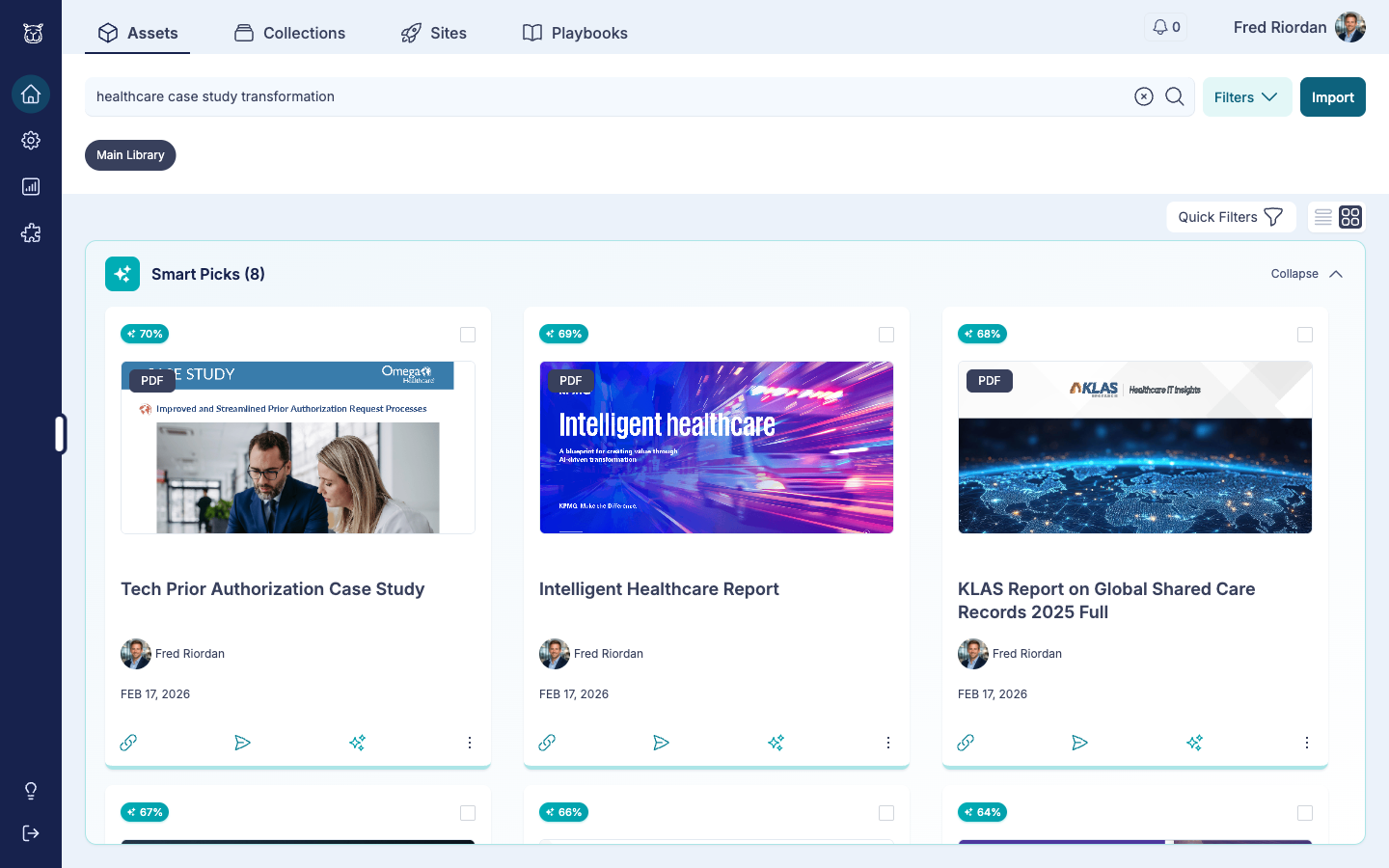
When you search, Content Camel runs two searches at the same time:
- Instant keyword results – your existing search returns matches in milliseconds, same as before
- AI Smart Picks – our RAG engine analyzes your query against the full text of every document in your library, then returns ranked results with relevance scores
Each Smart Pick shows a percentage match – 70%, 69%, 68% – so you can see at a glance which assets are the strongest fit. No more guessing.
AI Match Context: understand why it matched
This is the part I’m most excited about.
Click the AI icon on any Smart Pick card and a sidebar opens with deep context:
- Why this matched – the AI explains the connection between your query and the document’s actual content
- Key passages – highlighted excerpts from the document that are most relevant
- Positioning guidance – how to frame this asset for your specific use case
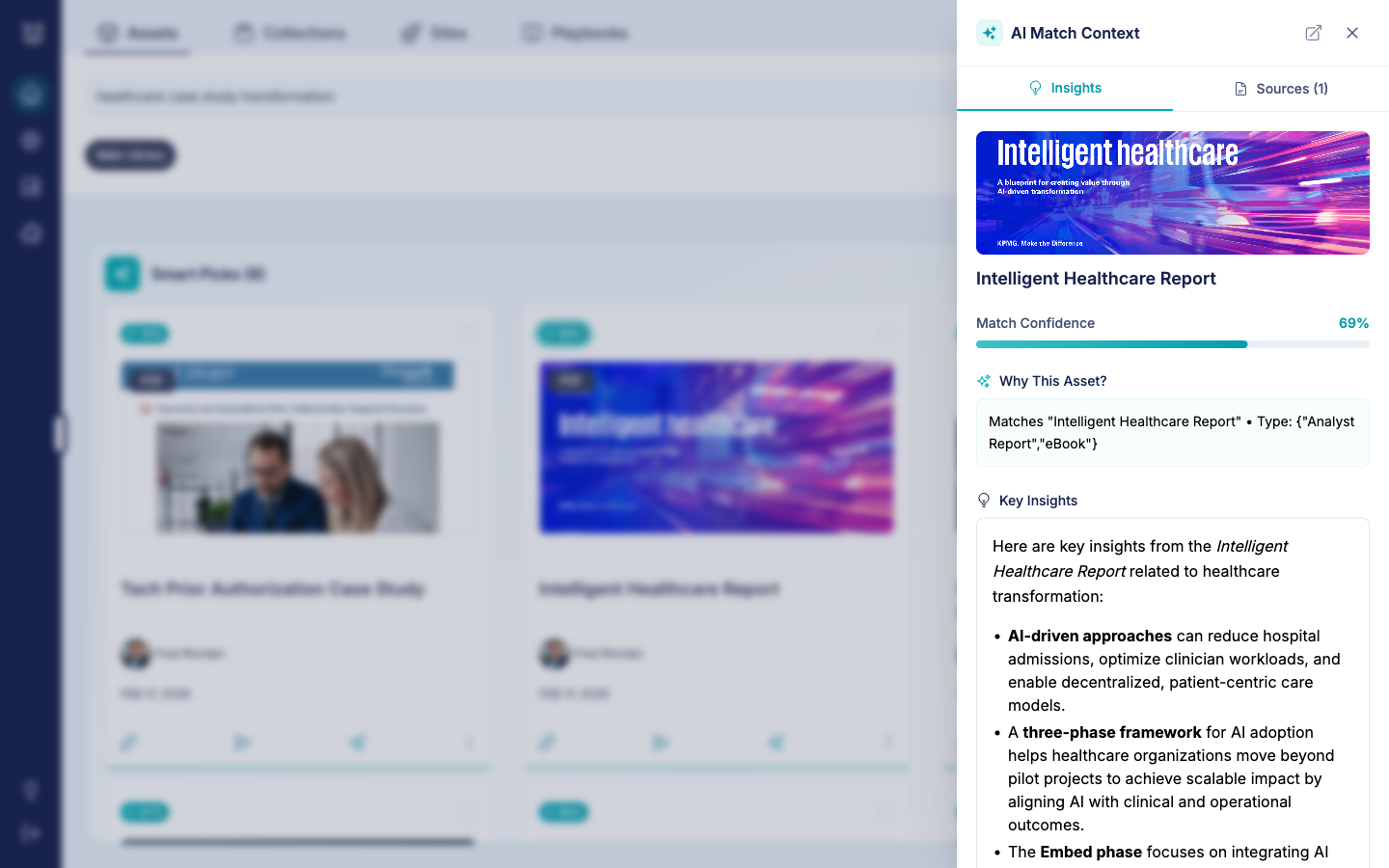
No more opening five PDFs to figure out if they’re the right fit. The AI tells you what’s inside and how it connects to what you need. Boom.
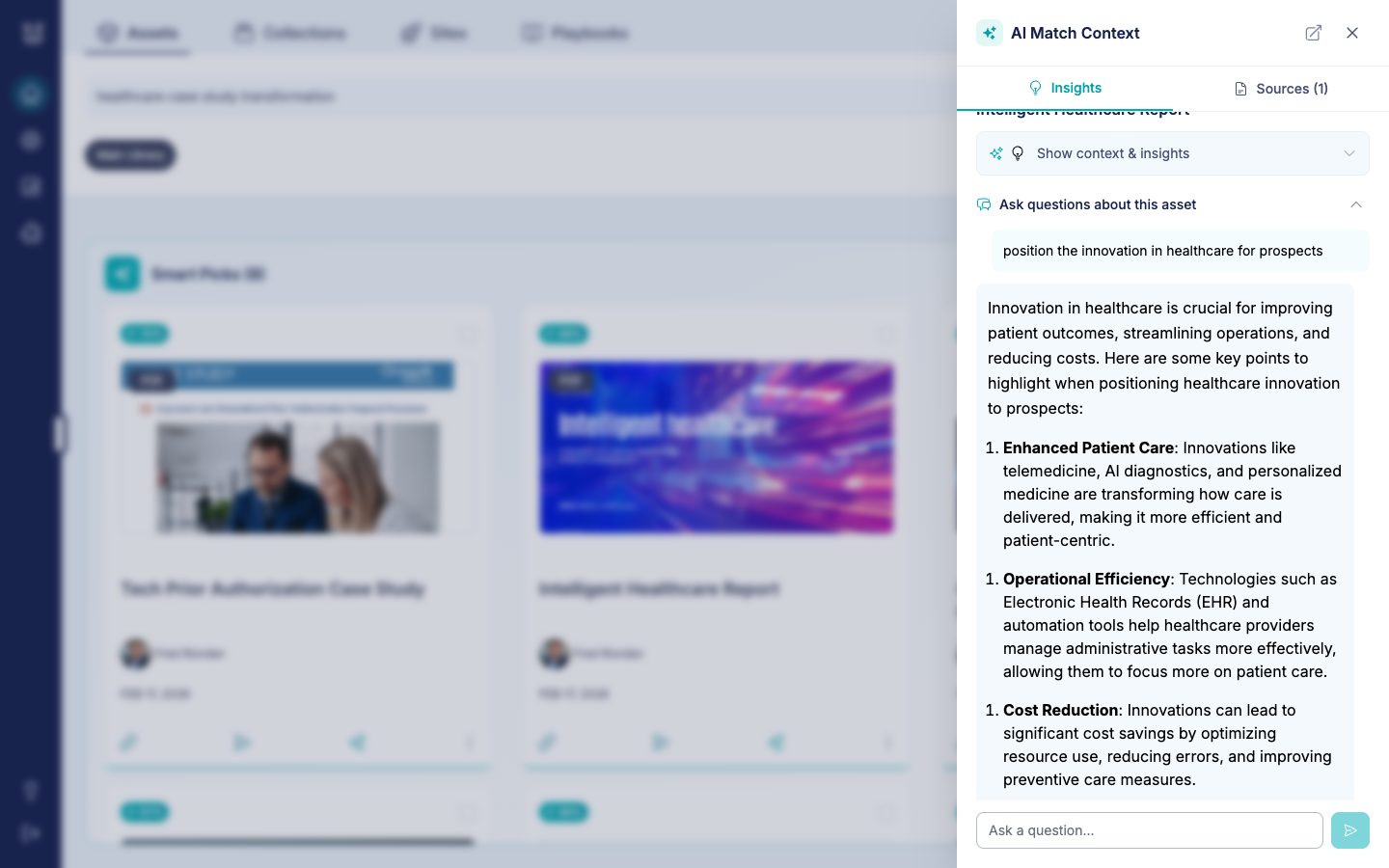
Ask questions about any document
Want to go deeper? Every document has a built-in chat. Ask it anything:
- “How should I position this for a healthcare CTO?”
- “What are the key stats I should highlight?”
- “Does this cover data migration concerns?”
The AI reads the full document and gives you a conversational answer – like having a content expert on speed dial.
AI chat for your buyer-facing sites
Ok, so AI search for your internal team is great. But we didn’t stop there.
We’ve brought AI-powered chat to your prospect-facing Content Camel Sites – the personalized content hubs you share with buyers.
Enable it with one click
In the site editor, toggle on AI Chat Assistant. That’s it. Your prospect-facing site now has an intelligent chat widget that answers questions about the content you’ve curated for them.

Prospects get instant answers
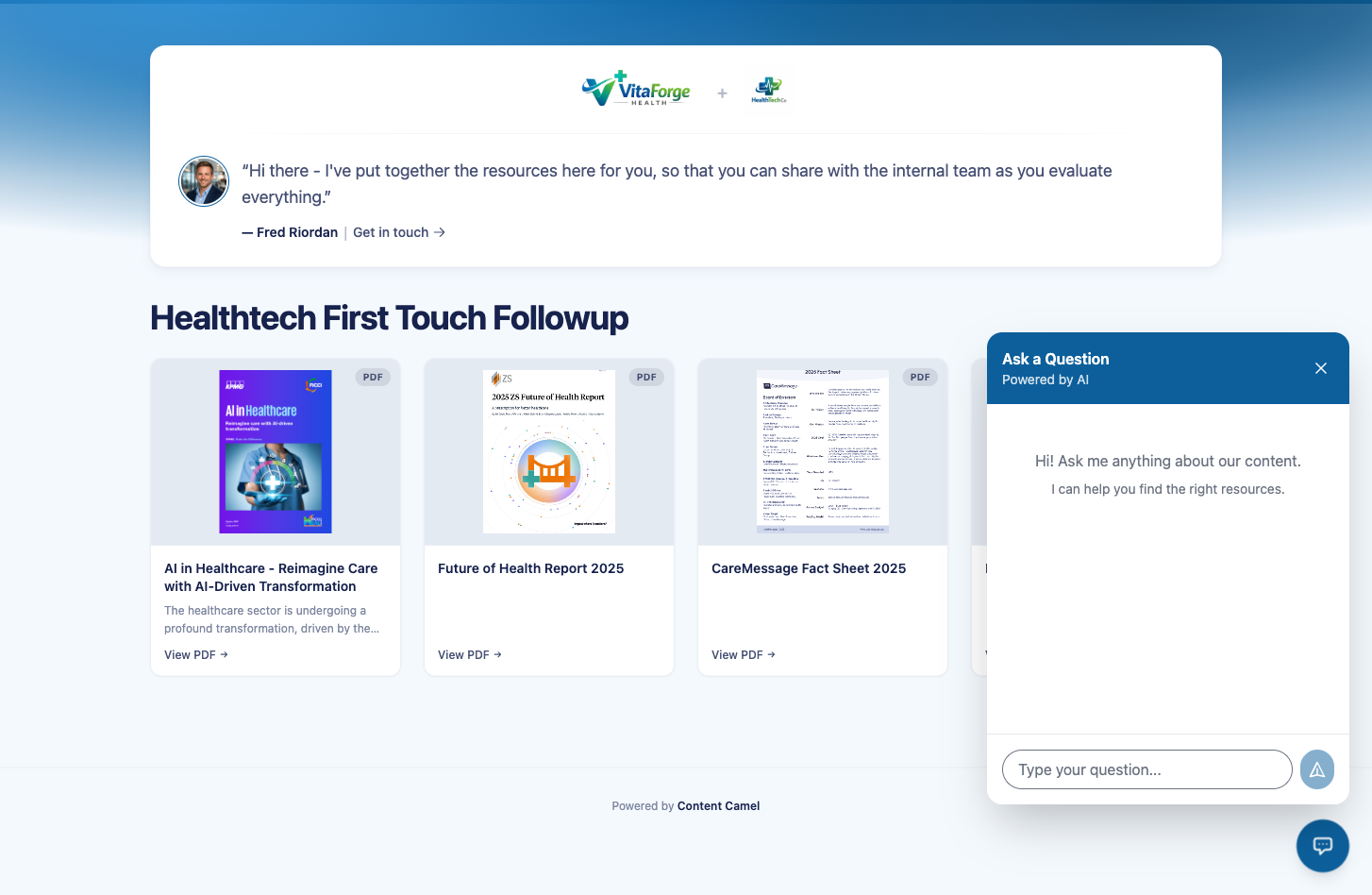
When a prospect visits your site, they see an “Ask a Question” chat widget. They can ask anything about the resources you’ve shared:
- “What healthcare AI solutions are covered here?”
- “How does this compare to what we’re doing today?”
- “What’s the ROI case for this?”
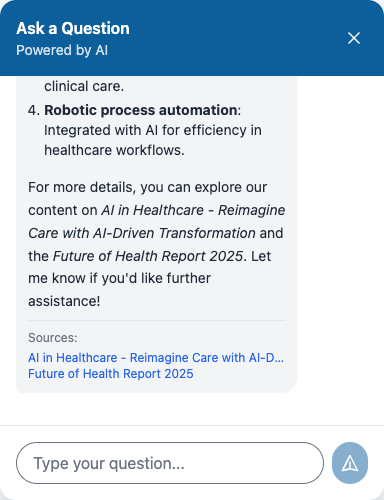
The AI draws from the actual documents on the site to give informed answers – complete with source citations that link back to the relevant assets.
Rich, cited responses
These aren’t generic summaries. The AI returns structured answers with bullet points, key takeaways, and links to the specific documents it referenced. Prospects can ask follow-up questions in the same conversation.
Your content works harder, even when you’re not in the room. That’s a big deal.
Who benefits
For sales reps:
- Find content faster – search naturally instead of guessing at keywords and tags
- Understand your content – AI explains what’s inside every document
- Prep for calls in seconds – ask the AI how to position any asset for your specific prospect
- Share smarter – send prospects a site with AI chat built in
For marketing:
- Unlock your content investment – assets that were buried are now discoverable by meaning, not just metadata
- Reduce the “what should I send?” requests – reps can self-serve content discovery
- Extend content reach – buyer-facing AI chat means your content keeps working after you hit send
Under the hood
For the technically curious: Content Camel’s AI search is built on a Retrieval-Augmented Generation (RAG) architecture. We parse the full text of every document in your library, create contextual embeddings, and run hybrid retrieval (vector similarity + BM25 lexical search) in parallel.
Your data stays in your account. AI responses are grounded in your content – no hallucination, no generic answers.
Getting started
AI Search is live now for all Content Camel accounts. No setup required.
- Internal search – just start typing in the Assets search bar. Smart Picks appear automatically alongside your existing keyword results.
- Buyer-facing chat – go to Sites, edit any site, and toggle on AI Chat Assistant.
And if you haven’t tried Playbooks yet – that launched today too. It maps your content to buyer journey stages so reps always know what to send and when. Between Playbooks and Advanced AI Search, your team just got a lot more dangerous.
Let us know what you think – support@contentcamel.io.