You built 200 assets. You have no idea which ones your sales team uses.
Stop guessing. Start measuring.
Track what reps share, what prospects engage with, and where the content gaps are. Make more of what works. Retire what doesn’t.
Updated October 2026
Content Camel Analytics tracks what reps share and what prospects actually open, page by page, so marketing can see which assets move deals and which just sit in the library. Content gap and freshness signals come from the same view.
Flying blind on content
Marketing creates 10-20 assets per month. You have zero visibility into how many of them ever reach a prospect.
You find out a case study you spent two weeks on has been shared exactly once. Meanwhile, a quick one-pager is the team’s go-to. You had no way to know.
Reps send content to prospects and you have no idea if it was opened, read, or ignored. Follow-ups are based on guessing, not data.
Content gets stale. Nobody flags it. Nobody retires it. It sits in the library with a 2023 date and outdated pricing.
The cost of flying blind on content
You can’t prove content ROI. Leadership asks what marketing’s content is doing for the pipeline. You have anecdotes, not data.
Top-performing content doesn’t get replicated. A one-pager is getting shared 10x more than anything else. You don’t know, so you keep making more white papers nobody sends.
Content gaps stay invisible. Reps search for ‘healthcare case study’ every week. It doesn’t exist. You don’t know they’re looking for it.
Stale content stays in circulation. A deck from two years ago is still being shared. Nobody flagged it because there’s no aging visibility.
What Analytics gives you
Content usage tracking
See which assets your team shares most frequently. Identify your top performers and your shelf-sitters.
Prospect engagement
Page-by-page engagement data: what they opened, how long they spent, when they came back. Time your follow-up perfectly.
Team activity
Who's using the platform? Who's a power user? Who hasn't logged in since onboarding? Spot adoption issues early.
Content gap signals
Track what reps search for but can't find. Those failed searches are your content roadmap.
Freshness tracking
Every asset shows when it was last updated. Set review cadences. Flag stale content before it reaches a prospect.
See Analytics in action
Short walkthrough video — coming soon
Engagement, down to the link
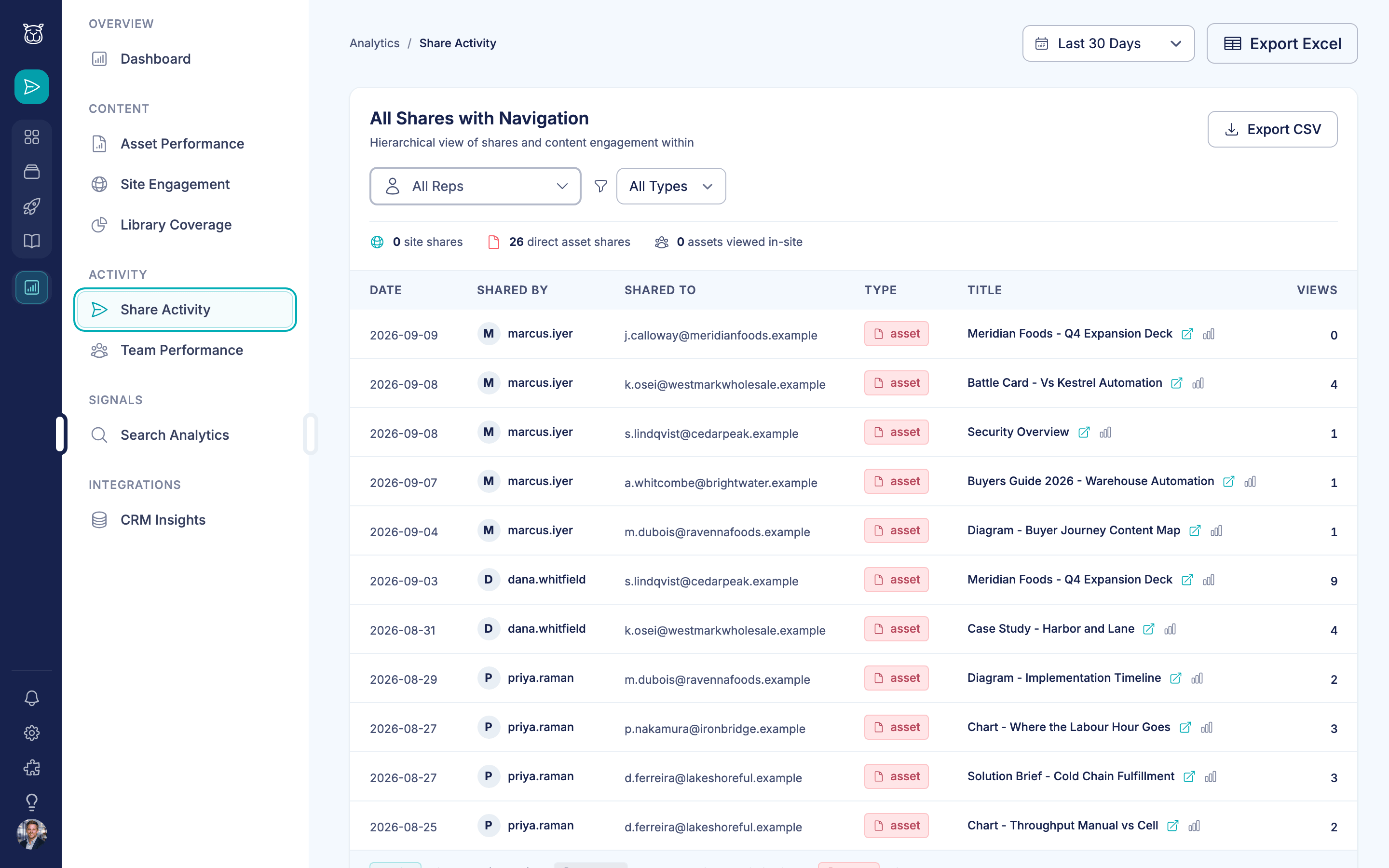
Every share shows who sent it, who opened it, and how many times.
How teams use Analytics

Marketing reviews the monthly content report
Open the analytics dashboard. Sort by shares and engagement. The battle card you updated last week has been shared 47 times. The industry guide from Q1 hasn’t been touched in 6 weeks. You know what to make more of and what to retire.

Identifying content gaps from search data
The ‘Searches with no results’ report shows reps searching for ‘data security one-pager’ 12 times this month. It doesn’t exist. Marketing adds it to the sprint. That feedback loop is automatic.

Proving content ROI to leadership
Pull the engagement report: these 5 assets were shared in 80% of closed-won deals last quarter. The content team’s work isn’t theoretical — it’s directly tied to revenue.

Content aging alerts
Content Camel flags assets older than 90 days that are still being shared. The pricing deck from last quarter is still going out. Time to update it or remove it — before a rep sends the wrong numbers.
Per-page
prospect engagement data
Team-wide
content usage visibility
Automatic
content gap detection
"We're paying a lot for a tool that we're not being able to take advantage of fully, and no one over there can help us do that."Marketing Lead, Facilities Management SaaS — on their enterprise platform
Frequently asked questions
What's the difference between Analytics and CRM Insights?
Can I see which content prospects actually opened, not just what reps sent?
How do I find content that's going stale?
Can I see which reps are and aren't using the platform?
What's a content gap signal?
Can I export analytics data?
Does analytics track shares made through the browser extension?
Ready to see what's actually working?
Get visibility into content usage and prospect engagement. Free plan available.