Your content lives in Content Camel. Your deals live in HubSpot. This report connects the gap.
Content reporting, in deal terms.
CRM Insights is content analytics joined to your CRM: Content Camel matches content engagement to your HubSpot deals. You see which assets appear in closed-won deals, who sends them, and how that changes by deal size and stage. Every number drills down to the deals behind it.
Updated October 2026
CRM Insights is Content Camel’s reporting layer that joins content engagement to your actual HubSpot deals, showing which assets appear in closed-won deals and who sends them. Numbers drill down to the real deals behind it, cut by deal size and stage.
An incomplete picture today
Execs ask what content contributed to pipeline this quarter. You only have share counts and view counts. None of them mention revenue.
A case study feels like it’s working. Whether it shows up in won deals or lost ones is a question you can’t answer without an export and a deep dive.
Your best rep sends different content than the rest of the team. That pattern is invisible in your current reporting.
The content-to-deal report is a spreadsheet you rebuild by hand every quarter, from tools that don’t talk to each other.
What the missing report costs you
Content budget gets defended with anecdotes. When the ask is ‘show me the impact,’ a half-baked spreadsheet alone won’t do the job.
Winning patterns stay private. The content mix behind your best rep’s closed-won deals is knowable. Without joining the CRM data, you’re guessing at it.
Investment follows volume, not outcomes. You keep making more of what gets produced fastest, because nothing tells you what shows up in deals that close.
What CRM Insights gives you
What content drives closed deals, and who sends it
One view pairs the two answers that matter: which assets appear in won deals, and which reps are sending them. Asset names link to the asset; every deal links to its real HubSpot record.
Groups by deal size and stage
Deal-size bands come from your actual deals, not fixed buckets. See what content drives your biggest deals versus quick wins, and where in the pipeline each asset does its work.
Drill down on every number
No dead-end metrics. Click any number to see the underlying deals, the content attached to them, and the people involved. Expand a deal or jump straight to it in HubSpot.
Defensible numbers
Small samples get flagged (fewer than five deals), coverage shows as a percentage, and the reporting stays at correlation — it never claims your one-pager caused the win. You can defend these numbers in a QBR.
Raw data export everywhere
Every view exports its raw data, so you can pull it into a spreadsheet or your BI tool instead of screenshotting a dashboard.
See CRM Insights in action
Deal-level detail and deal size bands
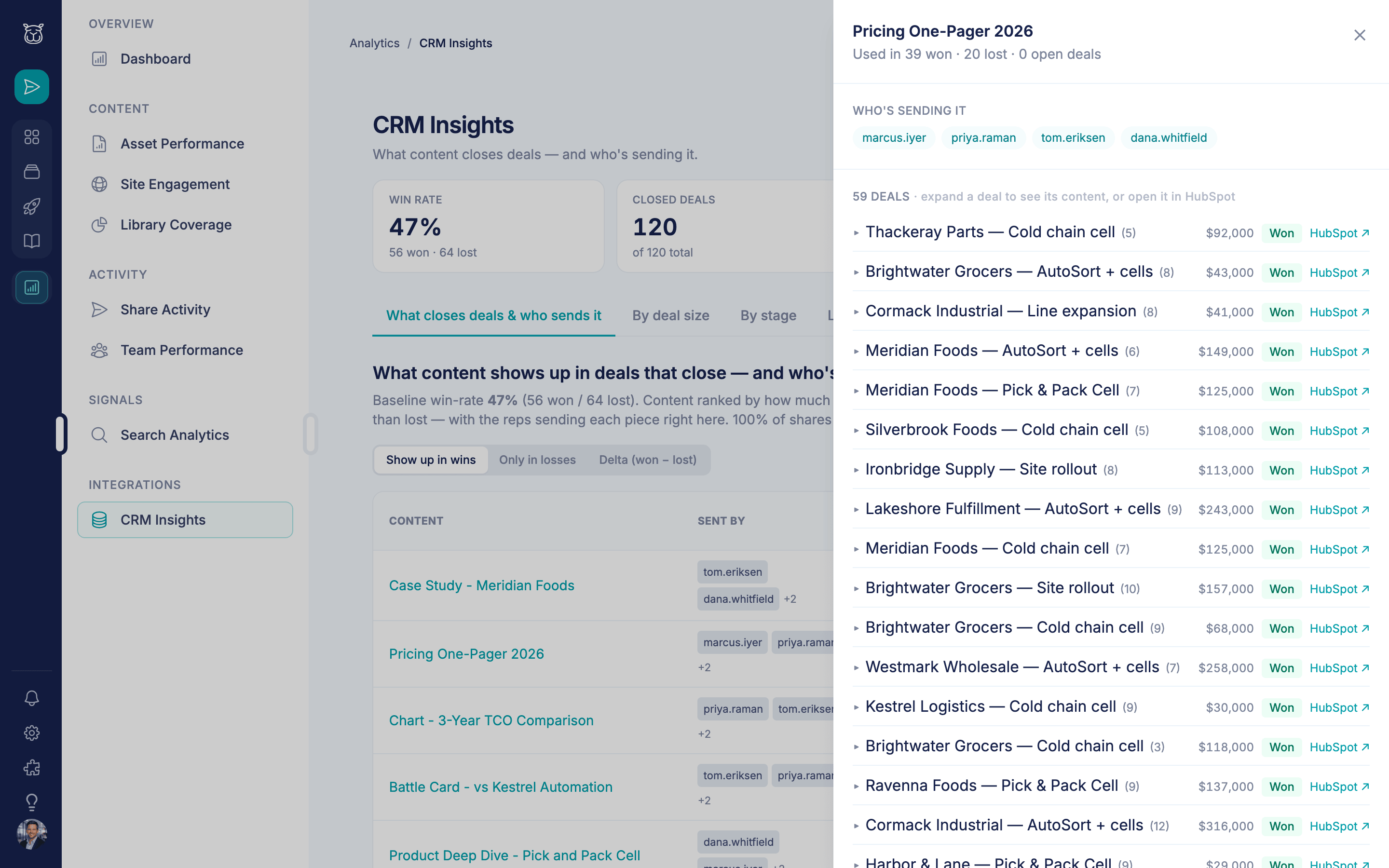
Drill into any number to see the deals behind it, and jump straight to HubSpot.
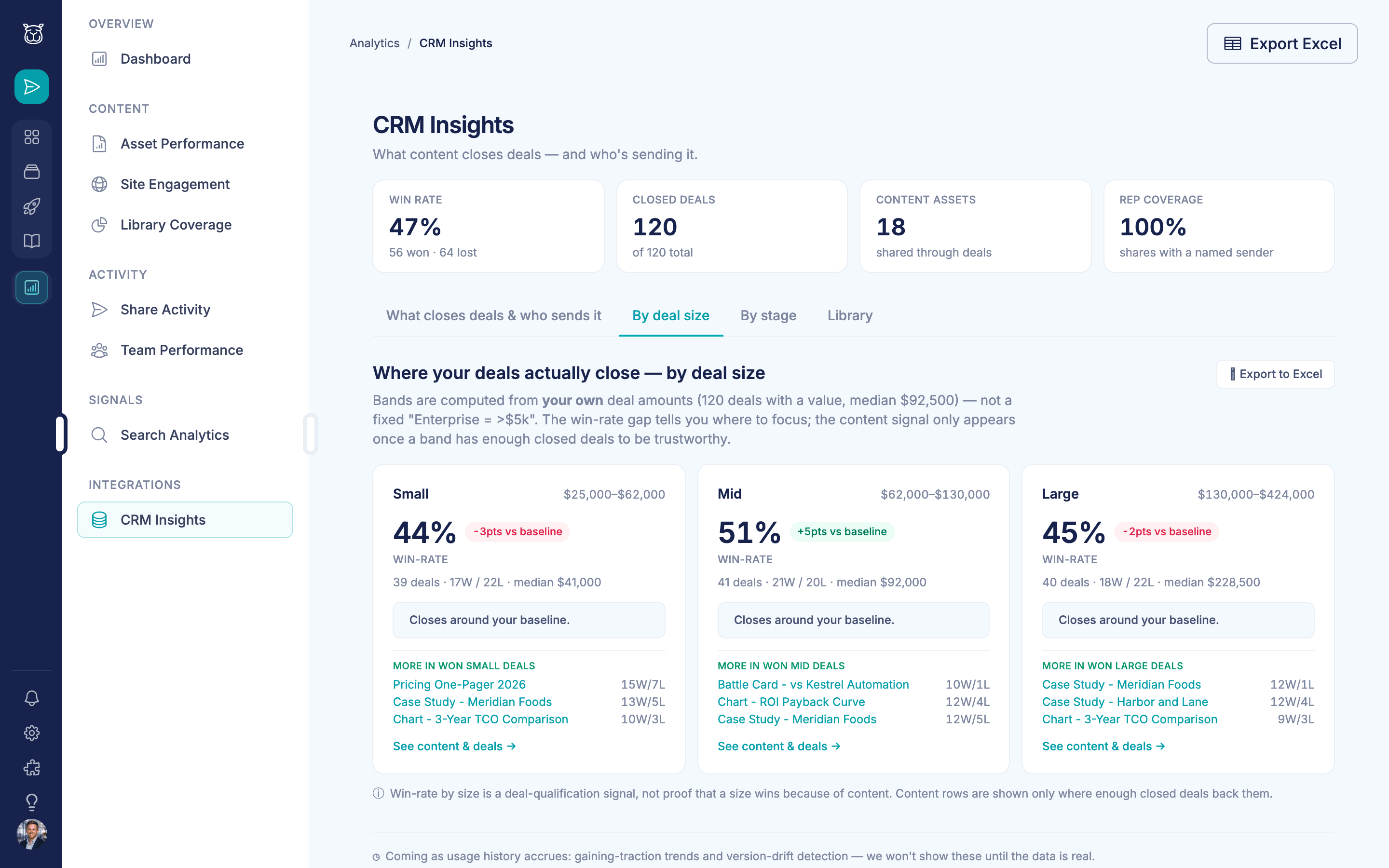
Deal-size bands come from your own deal amounts, not fixed buckets.
How teams use CRM Insights

The quarterly content review, with deal numbers in it
Instead of ranking assets by views, you rank them by presence in closed-won deals. That unglamorous one-pager turns out to sit in most of your largest wins. That’s next quarter’s template.

Finding the pattern behind the top rep
Drill into who sends the winning content. One rep leads the leaderboard because she sends the ROI calculator at proposal stage. Now it’s in the playbook for the whole team.

Working a stalled deal
From a deal in the report, jump to its HubSpot record with the content history in mind. You can see what this buyer engaged with, and what similar won deals saw that this one hasn’t.

Answering the data nerds with exports, not anecdotes
Pull the raw export behind the won deals view and hand over the actual deal list. Every number in the deck traces to deals the analyst can open in HubSpot.
Deal-level
drill-down behind every number
Live
HubSpot connection via OAuth
Every view
exports its raw data
Frequently asked questions
What does CRM Insights actually show?
Which CRMs are supported?
How does the HubSpot connection work?
Do reps have to log anything for this to work?
Can I trust these numbers in front of leadership?
Can I export the data?
What plan includes CRM Insights?
Ready to see content in deal terms?
Connect HubSpot and get the content-to-deal report you've been rebuilding by hand.