Your master deck has 60 slides. This prospect needs 11 of them.
Every deal gets its own deck.
Slide deck management is turning your master decks into a searchable slide library, so reps can build a tailored deck for each deal from approved slides without opening PowerPoint. Content Camel breaks the deck into slides, tracks every share, and keeps composed decks current when the master changes.
Updated October 2026
Slide deck management turns a master PowerPoint deck into a searchable slide library, so reps compose a tailored deck per prospect instead of copying slides by hand. Content Camel calls this the Deck Composer: update the master and every composed deck updates too.
The copy-paste deck economy
Marketing ships the master deck. A week later there are nine FINAL-v2-acme copies on nine laptops, each edited a different way.
A rep needs the pricing slide from one deck and the security slides from another. The only path is copy-paste into a new file that drifts off-brand the day it’s made.
You update pricing in the master. The tailored versions reps actually send still show the old numbers, and you have no way to find them.
Tailoring a deck takes 30 minutes in PowerPoint, so most prospects get the whole 60-slide master instead of the slides that fit their deal.
What deck sprawl costs you
Stale decks reach prospects. The deck a rep sends in week six was tailored in week one. Old pricing, old roadmap, your logo on every slide.
Marketing loses the thread. Once a deck is copied out of the library, you can’t see what’s being shown to buyers, let alone fix it.
Selling time goes to PowerPoint. Every tailored deck is half an hour of copy, paste, and reorder. Multiply by your deal count.
What slide deck management gives you
Slide decomposition
Upload a PowerPoint deck. Content Camel breaks it into browsable slides: a thumbnail, a title, and searchable text for each. PDF decks can be decomposed too (opt-in at upload). The original file is never modified.
A searchable slide library
Search 'pricing' or 'security' and find the right slide across every deck you can access. Browse in a grid or filmstrip. Open any slide full-screen to read it up close before you commit.
Compose per prospect
Pick slides from one deck or several, drag to reorder on the canvas, and name the deck for the deal. Undo works, autosuggested names work, and the result is a real library asset.
Composite publish with one tracked link
Publish renders your slide selection into a share-ready deck. Views are tracked like any Content Camel share, and republishing keeps the same link. Single-source decks also export as PPTX; mixed-source decks publish as one merged PDF.
Master-deck updates that follow through
Update the master and Content Camel diffs it slide by slide. Changed slides flow into the decks built from them and published decks republish automatically. Removed slides get a keep-or-drop review, and reps see a new-slides badge in the composer.
See the Deck Composer in action
Inside a deck: detail view and update review
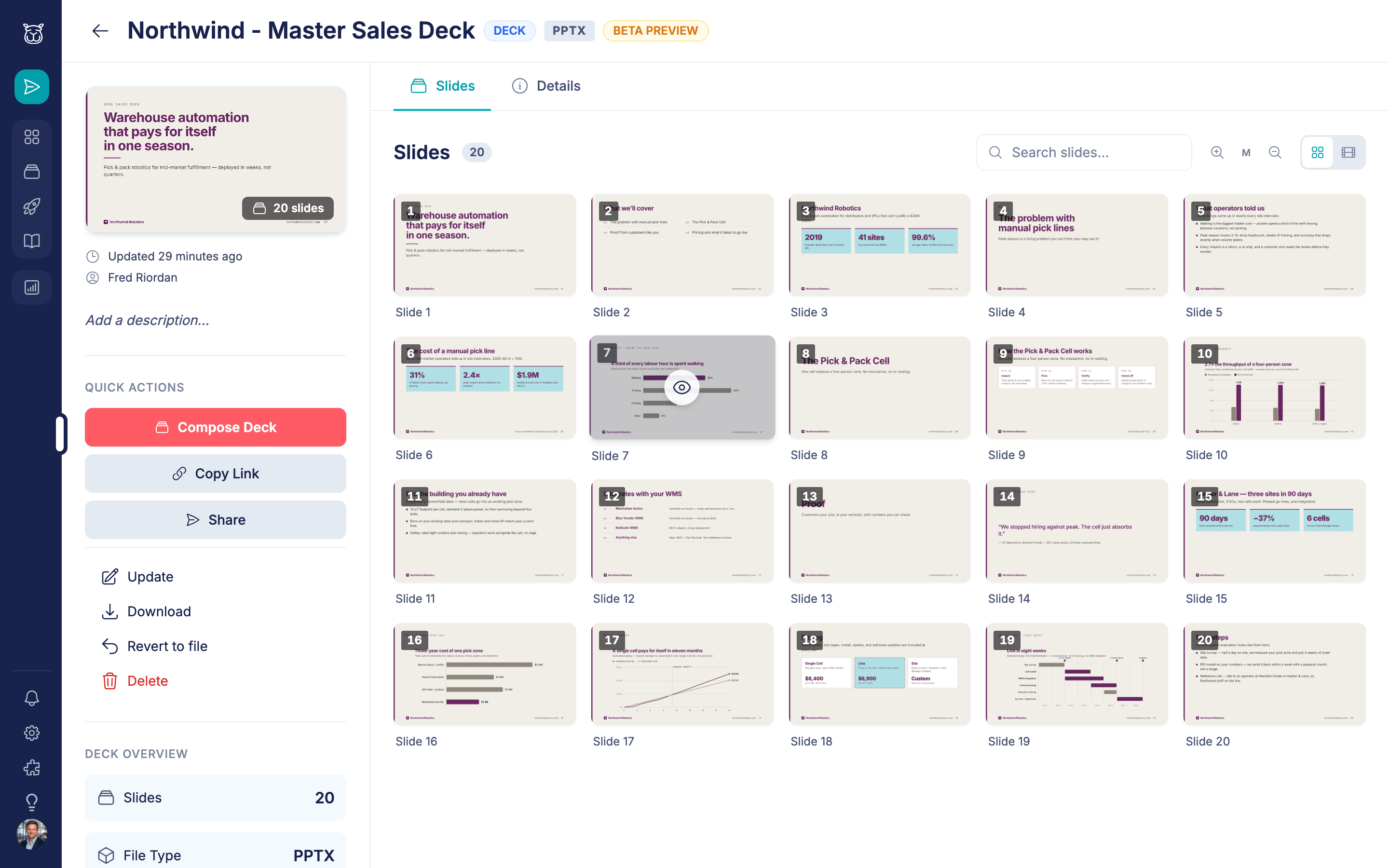
Every deck decomposes into a browsable slide grid.
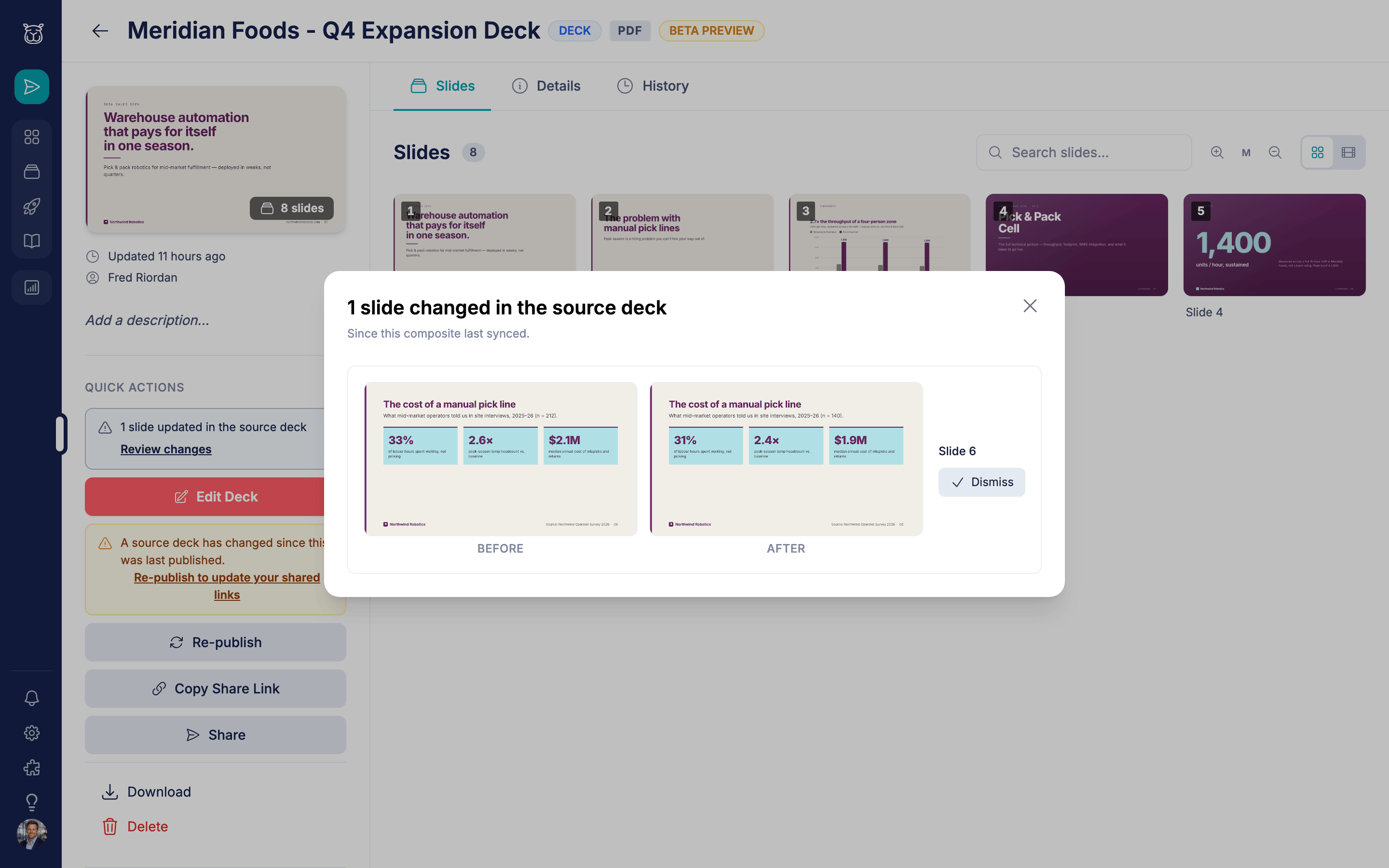
Master-deck changes surface here before they reach a published link.
How teams use slide deck management

A rep tailors the discovery deck in five minutes
Search ‘onboarding’, add four slides, pull the pricing slide from the sales master, drag them into order, publish. The prospect gets a clean 11-slide deck through a tracked link before the follow-up email would’ve finished uploading an attachment.

Marketing updates pricing once
New pricing lands in the master deck. Content Camel detects the changed slide, carries it into the decks reps built from it, and republishes them. The share links reps already sent now serve the current numbers.

Mixing decks for a security-heavy deal
The prospect’s IT team is in the room, so the rep composes the standard pitch plus three slides from the security deck. Mixed-source decks publish as one merged PDF, so the buyer sees a single coherent deck.

Reading the room after the meeting
The shared deck shows which slides the buying committee opened and where they spent time. The rep opens the next call on the slide they kept coming back to.
300
slides per deck, decomposed in full
Slide-level
search across every deck in the library
One link
that always serves the latest published version
Frequently asked questions
What file formats can be broken into slides?
Can reps edit slides?
What happens when the master deck changes?
Can a rep combine slides from different decks?
How do prospects view a composed deck?
Do content permissions apply to slides?
How long does slide decomposition take?
Is slide search full-text?
Ready to retire copy-paste deck building?
Upload a deck, break it into slides, and compose one for your next meeting. Free plan available.