Key Takeaway
Copy the ten-section template below into your own doc, fill it in from the middle out (pain, value drivers, proof first; positioning and the one-liner last), and keep it where your reps already work. The filled-in example shows what done looks like.
On this page
A product messaging template is a document that captures all of the messaging for a product – positioning, personas, pain points, value drivers, proof points, and approved copy – in one place, so everyone who talks about your product tells the same story. A complete product messaging document drives consistency and repeatability. Every piece of sales and marketing content built after it gets cheaper.
That’s the definition. Here’s the situation that sends people searching for one: most of the Sales and Marketing team are roughly on the same page about what your product does. But you’ve heard the CEO give 3 different short versions of the elevator pitch, and every single piece of collateral seems to reinvent the wheel. Consistency is what drives understanding with your buyer, and only consistency brings the repeatability that smooths out the purchasing cycle. So you searched for “product messaging template” and here you are.
Grab our free Product Messaging Template now
The template (copy this into your doc)
Below is the complete template, ready to paste into a Google Doc, Notion page, or wherever your team keeps its source-of-truth documents. Hit Copy as Markdown and it lands with the headings and tables intact. Prefer a spreadsheet? Grab the editable Sheets version, same structure, pre-formatted. The rest of this post walks through how to fill in each section, and there’s a filled-in example right after it.
Filling in ten sections by hand takes a while. If you’d rather start from a draft, the free Product Messaging Multiplier generates the positioning, value drivers, and competitor rows below straight from your product URL. No signup required.
Product Messaging: [Product Name]
Owner: [name] · Last reviewed: [date]
1. Positioning Statement (internal)
For [target persona] who [problem / trigger],
[Product] is a [category] that [key benefit].
Unlike [primary alternative], we [core differentiator].
2. Personas
| Persona | Role / title | What triggers their search | What they fear | What success looks like |
|---|---|---|---|---|
| [Persona 1] | ||||
| [Persona 2] |
3. Pain → Value Map
| Trigger | Problem state | Effect of doing nothing | Solution state | Impact (quantified where possible) |
|---|---|---|---|---|
4. Value Drivers (3 or fewer)
- [Value driver] — [one sentence: the essential benefit, in the buyer’s terms]
- [Value driver] — [one sentence]
- [Value driver] — [one sentence]
5. Differentiators
- [What sets you apart, and why existing customers care]
- [Second differentiator]
6. Proof Points
| Claim it supports | Proof (quote, metric, case study) | Source / link |
|---|---|---|
7. Features & Benefits
| Feature | One-liner | Short description | Benefit delivered |
|---|---|---|---|
8. Competitors
| Competitor | Their pitch | Where we win | Proof |
|---|---|---|---|
9. Product Messaging
One-liner (what the CEO says):
Short description (25-50 words, for web + decks):
Full description (100-150 words):
10. Boilerplate
[2-3 sentences about the company, approved for press releases,
partner pages, and directory listings. Written once, reused everywhere.]
Fill it in from the middle out. Sections 3 through 6 (pain, value drivers, differentiators, proof) are the work; sections 1 and 9 are assembled from them at the end. Teams that start at the top with the positioning statement tend to write a slogan and then spend the rest of the doc defending it.
A product messaging template example, filled in
A blank template is only half useful, so here’s ours. This is an abbreviated version of Content Camel’s own messaging doc, with the longer sections cut down. I’m biased about the product, obviously, but the point is to show what each section looks like with real answers in it instead of brackets.
1. Positioning statement (internal). For marketing leaders at B2B companies whose reps share sales content from a shared drive and can’t see what happens to it, Content Camel is a sales content management tool that puts every sales-facing asset in one searchable, trackable place. Unlike a Google Drive folder, it shows marketing which content reps use and which content buyers open.
2. Personas.
| Persona | Role | What triggers their search | What they fear | What success looks like |
|---|---|---|---|---|
| The buyer | Director of Marketing, PMM | A rep sent a prospect last year’s deck. Again. | Sales thinks marketing content is useless, and nobody can prove otherwise | Knowing which assets show up in closed-won deals |
| The user | AE, BDR, Customer Success | Ten minutes hunting for the right case study before a call | Sending the wrong file to a live deal | The right content in two clicks, from wherever they already work |
3. Pain to value map (one row). Trigger: a rep forwards an outdated pricing one-pager. Problem state: content lives in folders that haven’t been touched since the last rebrand. Effect of doing nothing: marketing keeps producing assets, sales keeps using six of them, and no one can say which six. Solution state: one library with tags, search and share links. Impact: marketing can retire what goes unused and double down on what closes.
4. Value drivers.
- Find it fast. Reps get the right asset in a couple of clicks, inside the tools they already use.
- Know what works. Marketing sees what reps share and what buyers actually open, page by page.
- Stay on message. Decks and links stay current when the master changes, so the field stops drifting from the doc you’re reading right now.
5. Differentiators. Prospects never need an account to view what a rep shares. Pricing is per active seat, so the people who only view content aren’t charged. And the content library follows the rep into Gmail, LinkedIn and the CRM through the browser extension.
6. Proof points (two rows). Claim: “marketing can see what closes.” Proof: CRM Insights matches content engagement to HubSpot and Pipedrive deals and shows which assets appear in closed-won deals. Claim: “reps stop sending stale decks.” Proof: when a master deck changes, slides flow into every derived deck and published links republish automatically.
9. Product messaging. One-liner: Content Camel is where sales content lives, gets shared, and gets measured. Short description: Content Camel is a sales content management platform for B2B teams. Marketing organizes decks, one-pagers, case studies and videos in one searchable library; reps share them as tracked links from wherever they work; everyone sees what buyers open.
Sections 7, 8 and 10 run several pages in the real doc and are mostly tables, so I’ve left them out here. Notice how little of the above is about features. The one-liner at the end is short because sections 3 through 6 did the thinking first.
Template, framework or messaging house?
You’ll see all three terms in the top results for this search, often used for the same thing. They aren’t quite the same. The distinction matters when someone on your team asks for “the framework” and someone else sends them a slide.
- The messaging framework is the set of decisions. Who it’s for, what category you’re in, why you win, and which three things you’ll keep repeating. You can hold a framework in your head; most teams shouldn’t.
- The messaging template is the working document where those decisions get written down, filled in and handed off. That’s what’s on this page.
- The messaging house is a drawing of the finished framework on one slide: the core message as the roof, the value drivers as pillars, proof points as the foundation. Useful for a kickoff deck. Useless as the source document, because nothing in it has a column for proof.
Fill the template in first. Draw the house from it afterwards, if your leadership team likes houses.
What makes good product positioning?
Good product positioning clearly communicates to your buying audience what your product is, who it’s for, what problems it addresses, how it’s differentiated from the competition, and how you uniquely deliver the solution to the buyer’s problem. The test of a positioning doc: can the other teams in Sales and Marketing build new content from it without coming back to ask what you meant?
Our guide takes a different approach than most other templates that are either too lightweight or incomplete, and uses the work that we started in a previous post, How to Create a Consistent Marketing Message, to focus on personas. Start with personas and the messaging comes out aligned with the buyer’s needs, which moves them down funnel faster. I also like product messaging frameworks that are repeatable across the whole team, so that every piece of collateral you develop drives home a consistent message.
Here’s how the rest of this post maps to the template. The doc is meant to be handed off, so we’re going to work through it out of order, with the positioning and the one-liner last:
- Buyer’s journey and pain (template sections 2 and 3)
- Value drivers, differentiators and proof (sections 4, 5 and 6)
- The path to purchase and features (section 7)
- Competitors (section 8)
- Positioning and product messaging (sections 1, 9 and 10)
How to Document the Buyer’s Journey
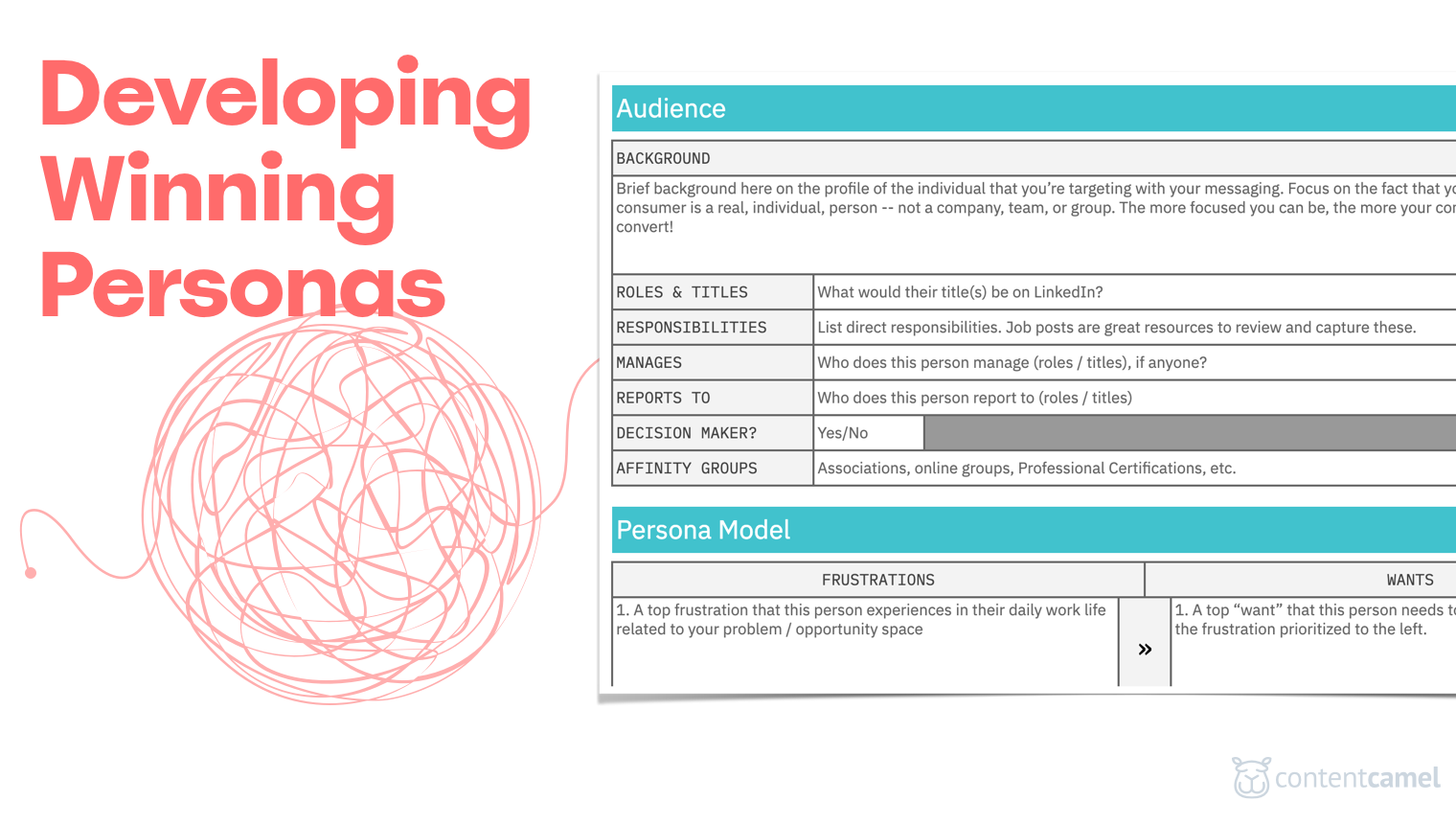
The persona and pain sections of the template provide the background on the buyer’s journey for your audience. A full template for building your ideal customer profiles can be found in our Marketing Messaging Guide post, but here we’ll either refer to those personas by name or offer a simplified overview of who we’re serving this content to.
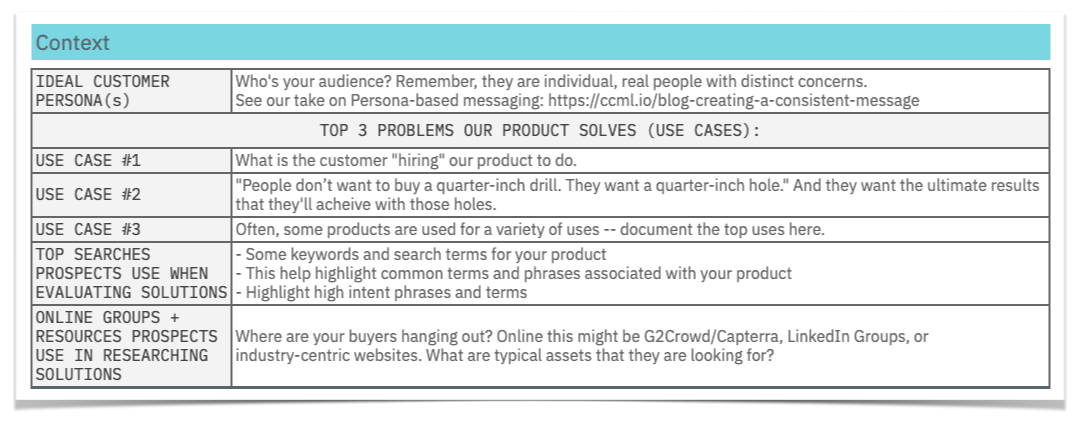
For more background, describe what “jobs” your customers “hire” your product to do. These are the documented use-cases. Some products serve multiple use cases, and if they’re sufficiently different, you might consider doing one template per major use-case.
For example, Trello is used as a workflow board (a kanban board), but it can also be used as categorized lists (no workflow). That’s two pretty different use cases.
Limit your use-cases here. Your customers aren’t hiring your product for 20 things; try to keep it to 3 or less.
Next, capture some high-level keywords and phrases that the prospect would be searching for as they seek to evaluate products like yours. This isn’t an exhaustive SEO analysis, but rather a way to communicate to the team the state of mind and common terms a buyer would be looking for.
Finally, are there any specific, frequent, and niche areas where prospective customers might be hanging out? If there are active online communities for your buyer, then document those here. These are key resources for your team as they translate this core messaging doc into other assets like eBooks, whitepapers, decks, and web pages.
No Pain, No Urgency
In the persona messaging template you documented the frustrations, wants, fears, and aspirations of your audience. Here we document the Triggers, Problem State, Problem Effects, Solution State, and Solution Impact.
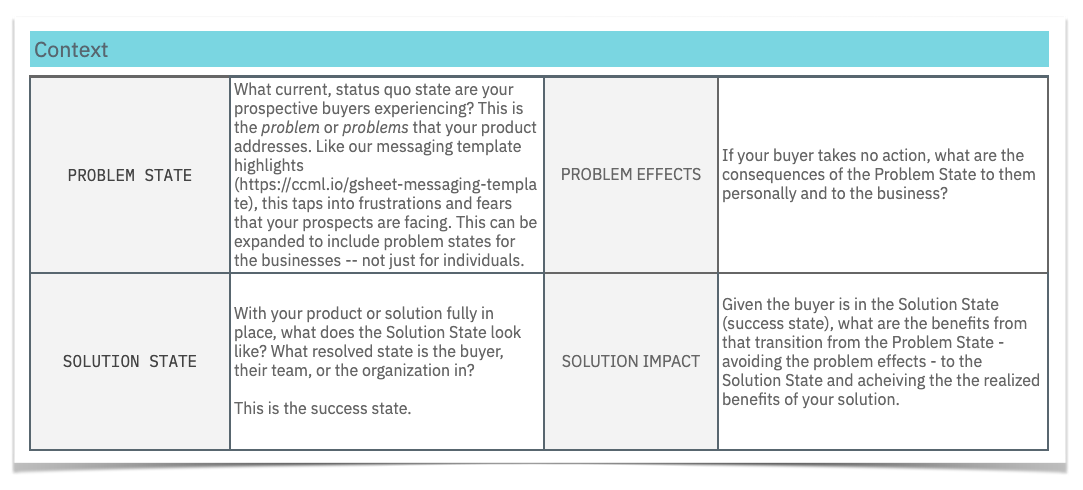
This is a critical area to spend time on. It drives the urgency behind the sale and will help focus content that’s designed to move the prospect down your funnel.
- Triggers – Document what’s suddenly driving your buyer to seek a solution. It’s not enough to have a problem. Your buyer has hit the Zero Moment of Truth with their problem and has started actively uncovering solutions.
- Problem State – The critical problem or problems your prospective buyer is facing. This problem may have existed for a while, but has suddenly been triggered. Hopefully this taps into frustrations they feel at a personal level and that they’re seeking to resolve. Naturally, it’s something that your product is effective at addressing.
- Problem Effects – What if your prospects did nothing about their problems? What’s the impact? To them? To the business? Document the net effects that the problems can have, and bonus points for the more specific and quantified you can be.
- Solution State – Working backwards from imagining a completed sale and implementation, what does success look like in your prospect’s terms? Tapping into this state can also unlock parts of your sales content strategy and the ability to build sales content from post-sale up to the top of the funnel.
- Solution Impact – Picture the world where your buyer has rolled out your solution. The problem state is improving, along with the effects it had on them (and the business). What’s the overall impact of that? This can be both in quantitative and qualitative terms. Using both, you can describe this to appeal to Gain, Loss aversion, and Logical arguments.
It’s important to write all of this down. It’s not enough to write down the problems, and it’s not enough to just sprinkle in some benefits. Refining the picture of the Problem State of your buyer, the Triggers moving them to action, and how far away your buyers are from achieving the benefits of the Solution Impact is the core of what drives urgency. Without a trigger and a perceived benefit, the friction of doing nothing is often too great to overcome.
The rest of the template positions your product as the key to the quantified, tangible outcomes written down in this section.
What drives value, what differentiates your product, and social proof
You know your product inside and out. So does most of your organization. I bet this section still gives you pause. A Value Driver is the essential benefit the customer gets from your product as the problem goes away. You get three. Your Value Drivers are the pillars you message around, described in terms of Gain, Loss aversion, and Logical Arguments. The hard part is getting down to 3 (or fewer) that the whole team will sign off on.

Why three? Past three, two things happen. The team stops agreeing on them, and the team stops repeating them. A value driver no one repeats isn’t driving anything. When we did this for our own product the first list had seven, and the four we cut were features wearing a benefit costume.
A good Value Driver is a high level statement of the qualities of the product that directly relate to the challenges of the Problem State. Skip the nice to haves and the feature jargon. If it isn’t in the buyer’s words, it isn’t a value driver yet.
All the positioning and messaging refers back to these Value Drivers. Every proof point exists to make one of them real.
What makes your product or service unique?
As you position your product, it’s helpful to use your audience’s existing frame of reference to compare and contrast your solution. Your key differentiators have to matter to your existing customers. They also have to set you apart from competitors and from the do-nothing alternative. The differentiators here can be something much larger than your features. It could be the services you bundle with your product (or the product that you bundle with your services), the experience of your employees, or who your existing customers are. Again, pick the most important ones to focus on and repeat instead of a never-ending list.
Prove Your Product Delivers
You already know customer testimonials and case studies work to demonstrate your product is successful. So, for Social Proof, amplify your top examples. Paint the picture for prospects as they move from their Problem State to your Solution State, told with Gain, Loss Avoidance, and Logical Argument messaging.
The proof points get used across the teams: in the marketing assets you create for your products, and by the sellers on the front lines every day. Capture as many here as you can, but make sure they’re compelling and help support your Value Drivers.
The Path to Purchasing
You want to have persona-driven product messaging that’s as relevant to your audience as possible, so understanding the sales cycle, the buyer’s journey, and their path to purchasing your solution influences how you position and message your products.

Understanding the sale means accurately capturing:
- Compelling events that trigger evaluating solutions to solve the prospect’s problems and the pain of the Problem State. We mention this above in Triggers.
- How you and your teams create urgency to buy. Which plays shine a light on the (hopefully) large gap between the Problem State and the Solution State? How do you work backwards from rollout to closed-won, all the way to initial contact? With great content along the way, of course.
- Who’s involved in the purchase decision? This is very often underestimated to be only 1 to 3 people, but can be as many as 12 to 20 people involved in a deal. Beyond a champion, who makes the decision? Beyond a decision maker, how does procurement work?
And, finally, you’ll document the features that address the Jobs to be Done that your audience is evaluating a solution based on. This is their checklist. What are the must-have features? Sometimes you’ll find a product gap where you’re missing a necessary capability (hopefully not). Bonus points if you can add a feature to the list that your competitors don’t have, but your audience cares about.
Given the buyer’s jobs to be done, how do you deliver on them with your features and solution? Can you describe how you excel at delivering on what’s required, maybe even better than anyone? You can refer back to your social proof here to repeat and underscore the value that drives your solution.
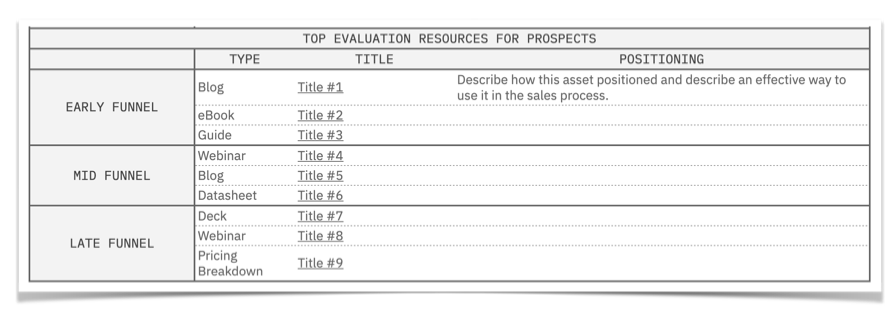
You’ll probably have a lot of content and assets that support the buyer in their journey. Highlight the key ones here, by funnel stage, so the rest of Marketing and Sales can see which materials put this messaging to work. If this is a new product launch, maybe you’re still building these out. Fill them in as they land.
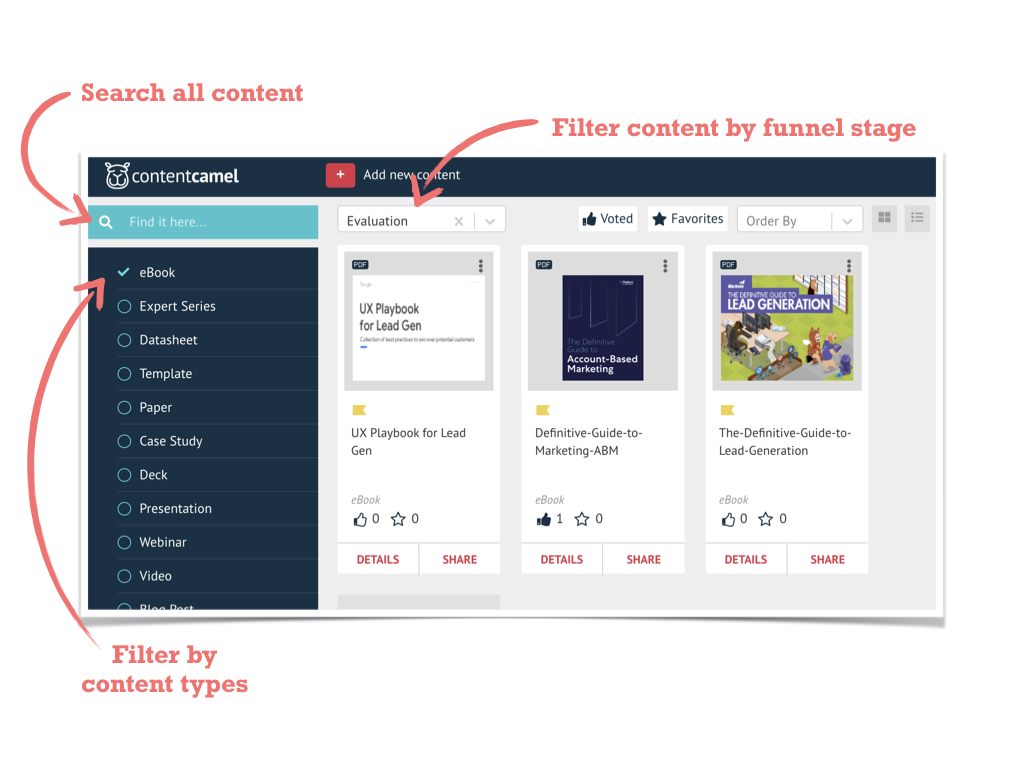
We’ve heard a lot of teams are really frustrated by trying to keep track of all of their Marketing and Sales assets, especially when it comes to tracking what’s actually being used. That’s why we created Content Camel: one content library where everything is easy to find, easy to share (including with our Chrome Extension), and tracked with content analytics so you can see which assets built on this messaging actually reach buyers.
How to Message Product Features and Benefits
You’ve worked through Value Drivers, the Problem State, the Solution State, the benefits and the metrics. You’ve documented Social Proof and what makes your product unique. Now describe each feature.
I think it’s easier to approach positioning features before tackling the overall product messaging, because, hey, a product is really just a collection of features (and the benefits those deliver).

The feature area of the template has three columns:
- Short description – Imagine using this description on a web page or snapshot of the feature in a sales deck. Ideally this showcases a value driver and hits on how it enables the benefits in the transition away from the Problem State.
- One liner – Distill the short description down to its essence, still in terms of loss avoidance, gain, or numbers. What would you have the CEO say about this feature in one line?
- Benefit – This feature likely delivers on a required capability, and, given that, what Solution Impact results does this contribute to?
If it’s easier, or you need it, add in a longer description and start from there. Then whittle that down to the short description and ultimately the one liner.
Repeat for all the key features that make up the product. This should be easier and repeatable now that you’ve got the Value Drivers in hand along with all the other well-thought-out background.
The Competitive Landscape and How Your Product Wins
Competitors. Everyone has them, and don’t forget that there’s nearly always a do-nothing alternative. Try to capture all the main competitors here and as much of the pricing as you can. The most important task is to position how you compete and win.

How does your product deliver better than the given competitor on the jobs to be done? What proof (customer quotes, testimonials, analyst notes, or market validation) supports how you do it even better?
You may not use this material directly in your marketing efforts, but you know that the majority of your buyers are going to do online research independently as part of their evaluation, so positioning relative to your competitors is important whether or not you call them out by name. For the Sales Team, bringing together a quick snapshot of how your product wins is a great start to building out more extensive assets like battlecards.
How to Write Great Product Positioning and Messaging
Ok, now we’re back up to the top of this core messaging template to wrap up with the top-level product messaging and positioning. This should be easier, because the buyer’s motivations are already on the page: their challenges, the cost of those challenges, and what success looks like once they’ve implemented a solution.
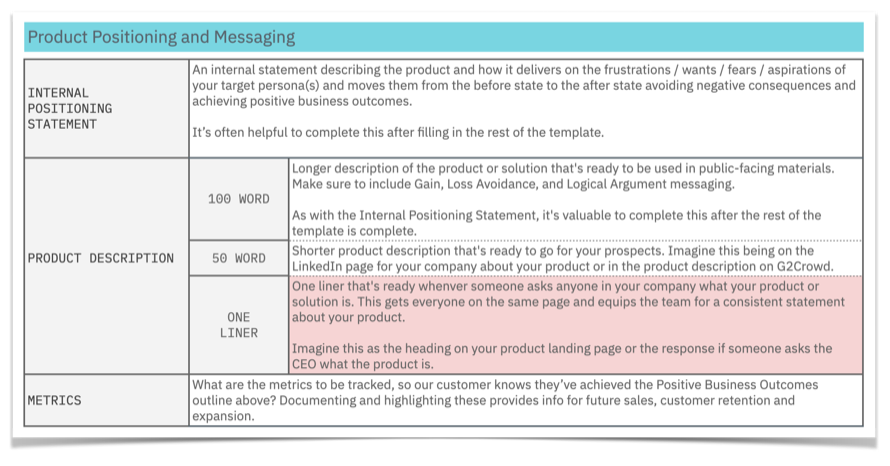
This is more than a jumble of words and quick snippets. You’ve got a framework in place now, one you can refer back to and hand to the other teams in the org to build on. This product messaging is part of that foundation. It will still take effort to wordsmith it, but it will be a lot easier now that all the supporting info is in one place.
You’ll want to summarize how the product is positioned with the Internal Positioning Statement. This wraps up everything we’ve covered here on the transition between problem and solution states and the values that drive the outcomes and metrics achieved in that journey. It’s a shorthand note to the teams and isn’t something you’d publish on a site.
The Product Description, though, is the public version of your product messaging, and I think it’s easier to start with the longest version of that and narrow it down shorter and shorter. You pull from the rest of the template to tell the story of your product and how it delivers on the Required Capabilities that are necessary to fulfill the use-cases the buyer would hire your product for. Try to hit on all your value drivers and throw in some differentiation.
Finally, the One Liner version of your message that would be the response when someone asks the CEO what your product is. Leave out jargon and make sure to really address what the audience cares about.
Metrics that support product success can be easy to state, hard to measure, and even harder to follow up on, but if you’ve got them, capture that here. It’s easier for some products versus others, but if you can nail down the metrics of success, you can revisit those in your customer marketing to drive further retention and expansion.
Should AI write your product messaging?
Honest answer: the first draft, yes. The decisions, no.
The free Product Messaging Multiplier reads your product URL and fills in a draft of the positioning statement, value drivers and competitor rows in about a minute. If you’d rather use a general-purpose model, paste the template above into it along with your homepage, a pricing page and two or three customer quotes, and ask it to fill in sections 1 through 9. Either way you’ll get a full page where you had brackets, and that’s a better place to start arguing from than a blank doc.
Two sections it will get wrong, from what I’ve seen running our own product through it:
- Section 6, proof points. A model has no access to your customer quotes or your numbers, so it either leaves the table empty or invents something plausible. Fill this one in yourself, from real sources, with links.
- Section 1, the positioning statement. The draft will be competent and will sound like most of your category, because that’s what it was trained on. The “unlike” clause is a decision your team has to make, and a model can’t make it for you.
Use the draft to find out where your team disagrees. That’s the actual work, and it goes faster when there’s something on the page to disagree with.
One template per product, per persona, or per use case?
The question that comes up most once a team has filled in the first one. My rule: one doc per product, with personas as rows inside it rather than as separate docs. Two persona docs drift apart within a quarter, and then you’re back to two stories.
Split by use case only when the jobs to be done are genuinely different, like the Trello example above. If the trigger, the problem state and the value drivers are the same and only the examples change, that’s one doc with a couple of extra rows in the features table.
Test your messaging before you ship it
Once the template is filled in, run your homepage through the Messaging Multiplier, our free tool that analyzes your site and rewrites your headlines using the same pain-driven frameworks this template is built on. Paste your URL, get a side-by-side in about 60 seconds. No signup, no email gate. If the rewrite beats what the template produced, your pain-to-value map needs another pass.
Put Your Product Messaging to Work
It’s some effort to document all of this, but it will seriously save you a lot of time and frustration as you go to market with your products. Done well, you’ll escape the cycle of runaway messaging and hearing the CEO (and others, of course) talk about your products a different way each time they explain what you do and what you’re selling. You’ll be ready to drop this doc on outside agencies, so they can help you expand your content efforts, and you’ll increase the impact that your content has in the buyer’s evaluation and journey.
My favorite part about documenting our product messaging this way is that it builds a system, one that can be used in repeated and consistent assets from emails to web pages to ebooks and more.
As you share it out to enable your team, make sure it’s accessible somewhere in your Google Drive, Dropbox, or better yet, Content Camel, marked internal-only and sitting right next to your sales decks, one-pagers, and winning blog post links.
One more 2026 note: the place messaging drift shows up first is in slide decks. Reps copy the master deck, tweak a slide, and three months later there are nine versions telling nine stories. If that’s your world, slide deck management keeps composed decks in sync with the master, so the messaging you just documented actually survives contact with the field.
Still managing sales assets the old way?